USB-C, Lightning, Micro-USB, USB-A to C, C to C — the drawer full of tangled cables in every Pakistani household tells the story. This guide is for anyone who has grabbed the wrong cable in a hurry, wondered why a new cable charges slowly, or wants to buy the right cable the first time. Here is every common cable type, explained in plain language.
Why Cables Matter More Than You Think
A cable is not just a wire. It determines your charging speed, your data transfer speed, and — with cheap cables — even your phone's safety. A premium fast charger paired with a thin, low-quality cable will charge slowly, because the cable itself becomes the bottleneck. When your charging feels slow, the cable is the first thing to suspect — before the charger or the phone.
The Connectors: What Plugs Into What
USB-C (the modern standard)
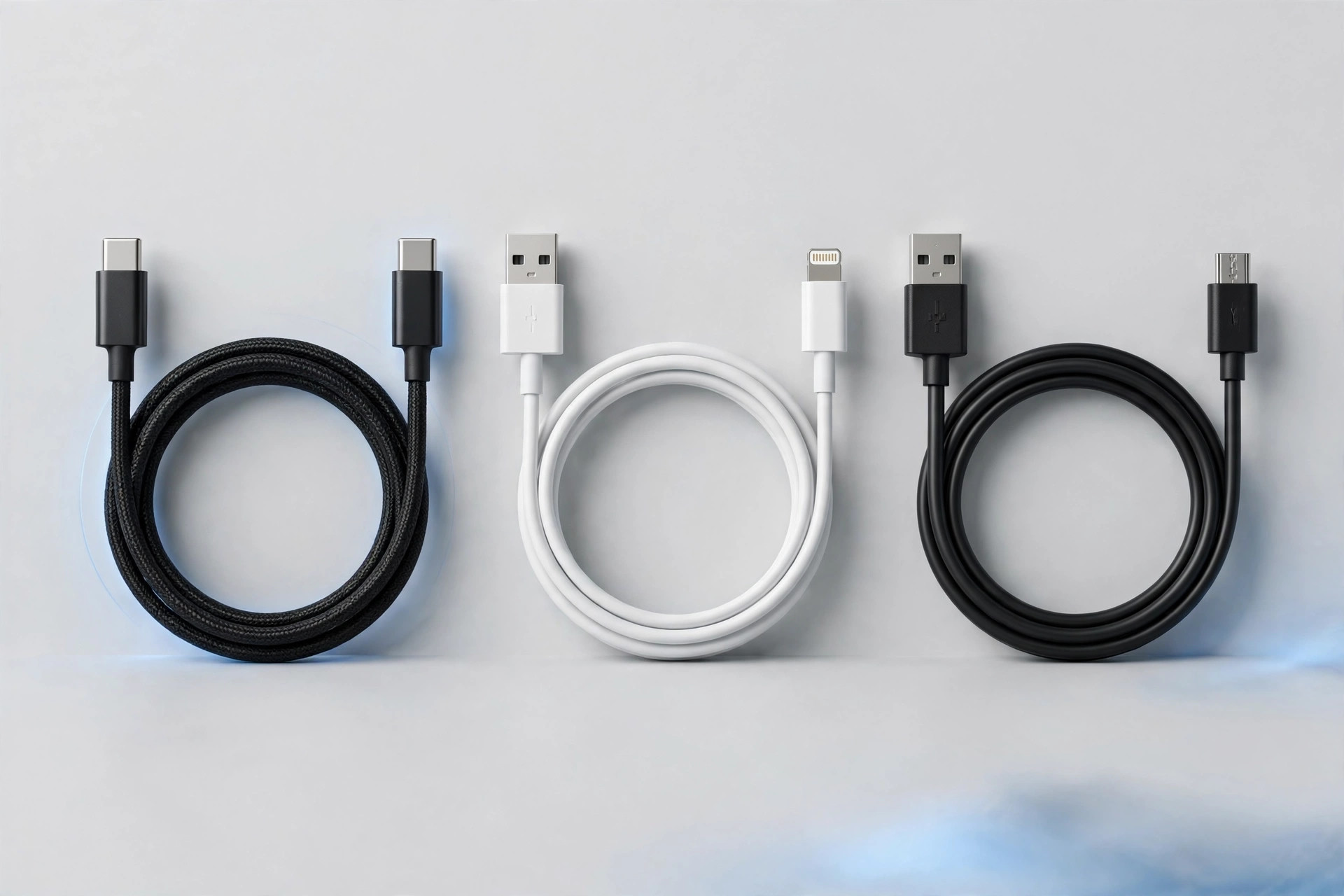
The small, oval, reversible connector on virtually all new phones, tablets, and laptops. USB-C supports the fastest charging (USB Power Delivery) and the fastest data transfer. If your phone was made in the last few years, it almost certainly uses USB-C. This is the cable type to invest in going forward.
Lightning (Apple's older connector)
Found on older iPhones (iPhone 14 and earlier), older iPads, and AirPods cases. Apple has moved new iPhones to USB-C, but millions of Lightning devices are still in daily use across Pakistan. If you own one, keep a good Lightning cable around — but buy USB-C for anything new.
Micro-USB (the old Android standard)
The trapezoid-shaped connector on older Android phones, power banks, Bluetooth speakers, and countless accessories. Still extremely common in Pakistan because older devices last for years here. It charges slowly by modern standards and only plugs in one way, but you probably still need one in the house.
USB-A vs USB-C (the charger end)
This describes the other end of the cable — the part that plugs into the charger or laptop. USB-A is the old rectangular plug; USB-C is the new reversible one. A cable is named by both ends: USB-A to USB-C, USB-C to USB-C, USB-A to Micro-USB, and so on. For full fast-charging speed, you generally want USB-C on the charger end (C-to-C) paired with a USB-PD charger — read our charger buying guide for why.
What the Numbers Mean: Amps, Watts, and Data Speed
- Current rating (amps): A cable rated 3A can carry more power than a 2A cable. For fast charging, look for 3A or higher on USB-C cables.
- Data speed: Basic cables handle USB 2.0 speeds (fine for charging and everyday file transfers). Pricier cables support faster standards — only worth it if you regularly move large files.
- Length: Shorter cables (1m) charge slightly more efficiently and tangle less. Longer cables (2m) are convenient for bedside or sofa use but buy a quality one — cheap long cables lose more power.
Braided vs Rubber vs Silicone
- Braided nylon: Tougher exterior, resists fraying and tangling, lasts longer with rough handling. Slightly stiffer.
- Rubber/PVC: The standard cable jacket. Flexible and cheap, but frays at the connector ends over time.
- Silicone: Soft, ultra-flexible, tangle-resistant, comfortable to coil. A newer premium option.
The weak point of every cable is where the wire meets the connector. Look for cables with strain relief — the reinforced, slightly thicker section right behind the plug. That small detail adds months to a cable's life.
How to Tell a Good Cable From a Bad One
- It states its specs clearly: current rating (e.g. 3A), and ideally the charging protocols it supports.
- Connectors fit snugly — not loose, not forced.
- It has proper strain relief at both ends.
- It is certified or from a reputable maker — uncertified cables are a genuine safety risk with fast chargers.
- It actually delivers the speed it claims. If a new cable charges slowly, test with another cable before blaming the phone.
Cable Care: Make Them Last
- Pull by the plug, never by the cord.
- Do not bend cables sharply or wrap them tightly around chargers.
- Keep them away from heat (car dashboards in a Pakistani summer are cable killers).
- Replace any cable with exposed wiring or a loose connector immediately — it is not worth the risk.
One more habit: coil cables in loose, wide loops rather than tight wraps around the charger. Sharp bends stress the internal wires and are the slow killer of otherwise good cables.
Frequently Asked Questions
Can I use any USB-C cable with fast charging?
No. The cable must support the current your charger and phone negotiate. A basic USB-C cable may only carry 2A, while your phone wants 3A or more. For reliable fast charging, use a cable rated 3A or higher, ideally the one designed for your charger.
Why does my new cable charge slower than my old one?
Either the new cable has a lower current rating, or your old cable was actually fine and the problem is elsewhere (charger, port, or heat). Swap back and compare to isolate the cause.
Are expensive cables worth it?
Up to a point. A well-made mid-range cable with proper specs beats both a suspiciously cheap cable and an overpriced designer one. Pay for build quality and honest ratings, not branding.
How many cables does a household actually need?
A practical minimum: one USB-C to USB-C for fast charging, one USB-A to USB-C as backup, one Micro-USB for older devices, and a Lightning cable if anyone uses an older iPhone. Label them and stop buying random ones.
Can a bad cable damage my phone?
A very poor-quality cable with fast charging can overheat or deliver unstable power. It is rare with reputable cables, which is exactly why buying from a trustworthy seller matters.
The right cable is the one that matches both ends of your setup and carries the current your devices need. Browse quality cables at The Lands Store — check the current price on the site, order with cash on delivery anywhere in Pakistan, and stop fighting with slow, frayed cables.